
Sale!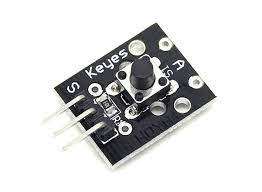
KY-004 Push Button Module COM54 ,R22
$ 93.54
DescriptionThe KY-004 Key Switch Module is a push button that will close the circuit when pressed, sending a high signal. This module is compatible with Arduino, Raspberry Pi, ESP32 and other platforms.The module of the push button is a fully-fledged device with which you can install it immediately in the project, without using a pull-up or tightening resistances, because this is already in the circuit. The button together with the resistor is located on the board, where there are holes for installation. The built-in resistor has a rating of 10 kΩ.The module is designed for two contacts: when pressed, they are closed and open when released. There are also 3 outputs on the board: I, S, 5V. Contact I is connected to the common wire of the circuit, S is the output of the module and 5V is connected to the power supply.Description: 1.Rating: 50mA 5-12VDC. 2. Contact Resistance : 50mΩ max. (initial) 3. Electrically Life: 100,000cycles. 4. Environment Temperature: -25°~ 105°. 5. Insulation Resistance: 100MΩ.(minDC 250V) 6. Dielectric Strength : AC250V.(50/60Hz for 1minute) 7. Operating Force: 180/230.(±20gf) 8. Seal Temperature: 250°-280°.Getting started with the KY-004 Push Button ModuleThis is a sample program that lights up an LED when a signal is detected at the sensor.Hardware requiredArduino UnoKY-004 Push Button ModuleJumper wiresConnecting the HardwareConnect the module signal pin (S) to pin 3 on the Arduino. Then connect the board power pin (middle) and ground (-) to 5V and GND on the Arduino respectively. CODEint led = 13; //Define the LED pin int buttonpin = 3; //Define the push button pin int val; //Define a numeric variable void setup() { pinMode(led,OUTPUT); pinMode(buttonpin,INPUT); } void loop() { val = digitalRead(buttonpin); // check the state of the button if(val==HIGH) // if button is pressed, turn LED on { digitalWrite(led,HIGH); } else { digitalWrite(led,LOW); } } RESULTSThe following Arduino sketch will continually read the button state on the module, when the button is pressed it will send a HIGH signal that will turn on the Arduino’s LED on pin 13.
Related products
-
Garnet Micro Bead Stretchy BraceletSelect options
This product has multiple variants. The options may be chosen on the product page
-
Garnet Faceted Bead EarringsSelect options
This product has multiple variants. The options may be chosen on the product page
-
Garnet Faceted Bead BraceletSelect options
This product has multiple variants. The options may be chosen on the product page
-
Garnet Oval Faceted Sterling Silver PendantSelect options
This product has multiple variants. The options may be chosen on the product page