
Sale!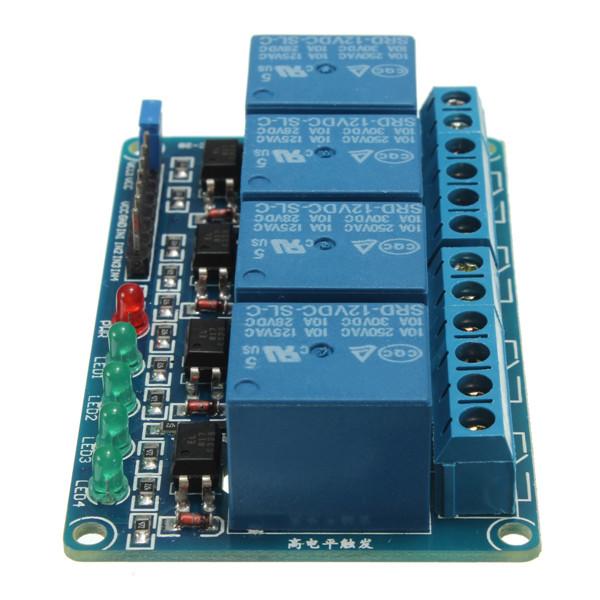
4 Channel 5V Relay Module MOD42 ,R11
$ 95.49
DescriptionThe four-channel relay module contains four 5V relays and the associated switching and isolating components, which makes interfacing with a microcontroller or sensor easy with minimum components and connections. The contacts on each relay are specified for 250VAC and 30VDC and 10A in each case, as marked on the body of the relays.One of the most useful things you can do with an Arduino is control higher voltage (120-240V) devices like fans, lights, heaters, and other household appliances. Since the Arduino operates at 5V it can’t control these higher voltage devices directly, but you can use a 5V relay to switch the 120-240V current and use the Arduino to control the relay.Four-Channel Relay Module PinoutPin NumberPin NameDescription1GNDGround reference for the module2IN1Input to activate relay 13IN2Input to activate relay 24IN3Input to activate relay 35IN4Input to activate relay 46VCCPower supply for the relay module7VCCPower supply selection jumper8JD-VCCAlternate power pin for the relay moduleSPECIFICATIONSupply voltage – 3.75V to 6VTrigger current – 5mACurrent when the relay is active – ~70mA (single), ~300mA (all four)Relay maximum contact voltage – 250VAC, 30VDCRelay maximum current – 10AHow the 5V 4-channel relay worksThe 4 channel relay module has three high voltage terminals (NC, C, and NO) which connect to the device you want to control. The other side has three low voltage pins (Ground, Vcc, and Signal) which connect to the Arduino.NC: Normally closed 120-240V terminalNO: Normally open 120-240V terminalC: Common terminalGround: Connects to the ground pin on the Arduino 5VVcc: Connects the Arduino’s 5V pinSignal: Carries the trigger signal from the Arduino that activates the relayInside the relay is a 120-240V switch that’s connected to an electromagnet. When the relay receives a HIGH signal at the signal pin, the electromagnet becomes charged and moves the contacts of the switch open or closed.Normally open VS. Normally closedThe 4 channel relay module has two different types of electrical contacts inside – normally open (NO) and normally closed (NC). The one you use will depend on whether you want the 5V signal to turn the switch on or turn the switch off.The 120-240V supply current enters the relay at the common (C) terminal in both configurations. To use the normally open contacts, use the NO terminal. To use the normally closed contacts, use the NC terminal. Normally openIn the normally open configuration, when the relay receives a HIGH signal the 120-240V switch closes and allows current to flow from the C terminal to the NO terminal. A LOW signal deactivates the relay and stops the current. So if you want the HIGH signal to turn ON the relay, use the normally open terminal: Normally closedIn the normally closed configuration, a HIGH signal opens the switch and interrupts the 120-240V current. A LOW signal closes the switch and allows current to flow from the C terminal to the NC terminal. Therefore, if you want the HIGH signal to turn OFF the 120-240V current, use the normally closed terminal:Getting started with the 4 Channel 5V Relay ModuleWhen the input terminals (IN1, IN2, IN3, IN4) are supplied with low level signals, you can see relay K1, K2, K3, K4 closed successively and repeat this cycle. In order to show its the ability of driving load more intuitively, 4 LEDs are connected to relay K1,K2,K3 and K4.Hardware requiredArduino UNOBreadboard4 Channel Relay ModuleJumper wiresConnecting the Hardware Code for controlling 4 channel relay moduleint ch=4; // number of relays int relay[]={2,3,4,5}; // pin number of relaysint wait=2000;int i=0; void setup() { for(int i=0; i<ch; i ){ pinMode(relay[i],OUTPUT); // set relay pins as output digitalWrite(relay[i],HIGH); // turn relay off } } void loop() { for(int i=0; i<ch; i ){ digitalWrite(relay[i],LOW); // turn relay ON delay(wait); } for(int i=0; i<ch; i ){ digitalWrite(relay[i],HIGH); // turn relay OFF delay(wait); } }RESULTS After to upload the code. You should see the relays open/closed one by one and the LEDs connected to K1,K2,K3 and K4 light up or go out with the relays opened or closed.
Related products
-
Garnet Micro Bead EarringsSelect options
This product has multiple variants. The options may be chosen on the product page
-
Garnet Faceted Bead EarringsSelect options
This product has multiple variants. The options may be chosen on the product page
-
Garnet Triple Sterling Silver Ring; size 7Select options
This product has multiple variants. The options may be chosen on the product page
-
Garnet Micro Bead Stretchy BraceletSelect options
This product has multiple variants. The options may be chosen on the product page